Part 2 of my OSGi series. This tutorial works on Linux and Windows, I haven’t checked with macOS, but it should work on that too. I run Linux Manjaro.
1. Download Equinox from one of the official sources https://download.eclipse.org/equinox/ choosing the “All of Equinox” option
2. Unpack the zip file in a folder of your choice, for me it is /home/collie/Equinox
3. In the folder Equinox/plugins rename the org.eclipse.osgi jar (for me, it is org.eclipse.osgi_3.13.200.v20181130-2106.jar) into something like osgi.jar to make it easier later (this is optional).
Now you have a basic Equinox environment. There used to be a console shipped with the main Equinox archive, but nowadays to get it you have to add additional jars and create a config.ini file to start them:
4. Get the missing jars to add console functionality, like explained here: https://stackoverflow.com/a/35922571
5. Open your eclipse plugins folder, mine was at /lib/eclipse/plugins
6. Copy the following files from your eclipse plugins folder into your /Equinox/plugins folder, with VERSION being something similar to 1.3.200v20181115-0906
org.eclipse.equinox.console_VERSION.jar
org.apache.felix.gogo.shell_VERSION.jar
org.apache.felix.gogo.command_VERSION.jar
org.apache.felix.gogo.runtime_VERSION.jar
7. At this point I renamed these jars in my /Equinox/plugins to not contain the version to make it more readable and useable.
org.eclipse.equinox.console.jar
org.apache.felix.gogo.shell.jar
org.apache.felix.gogo.command.jar
org.apache.felix.gogo.runtime.jar
8. In your /Equinox/plugins folder, there may be already a folder called “configuration”. If not, create it. Now create a file called “config.ini” in /Equinox/plugins/configuration.
9. Edit the config.ini file to say: osgi.bundles=org.apache.felix.gogo.runtime@start, org.apache.felix.gogo.command@start, org.apache.felix.gogo.shell@start, org.eclipse.equinox.console@start
We will edit this config.ini file every time we add a new bundle, so that Equinox installs and starts all the plugins stated in the config.ini file at the start. This makes it much easier so set up different plugins together.
Now we have set up a working Equinox configuration. The only thing left to do is switch to the plugin folder and start Equinox.
cd Equinox/plugins (or whatever your path is)
java -jar osgi.jar -console
It should look like this:
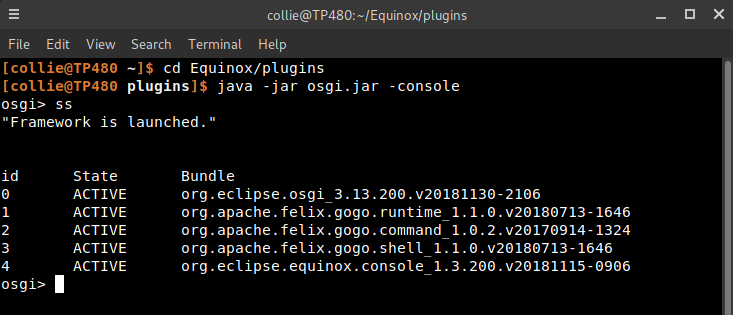
When you use the command ss it shows all running bundles (=plugins). You can now exit with the exit command.
Next: OSGi Part 3 – Export Eclipse projects as bundles and make them run in Equinox
Comments